Showing posts with label Converter. Show all posts

Wednesday, May 19, 2010

Xilisoft PowerPoint to Video Converter Business 1.0.3.0126


License: Shareware; $99.95 to buy
OS: WinXP
File Size: 79.82MB
Limitations: N/A
Last Update: 2010-04-28
System Requirements:
1GHz Intel/AMD processor or above;512MB RAM;50MB space for installation 

Description

Xilisoft PowerPoint to Video Converter Pro can convert PowerPoint presentations to SD/HD videos like AVI, H.264/MPEG-4 AVC, MPEG2, WMV, FLV, HD H.264/MPEG-4 AVC, HD MPEG 2 TS, HD WMV, etc. with watermark to protect the right of presentation authors. You can play the presentations on PC media player, HD multimedia devices and portable players, and even upload them to YouTube now.
Main Functions:
  • Convert PowerPoint presentation to video like AVI, WMV, MP4, MOV, H.264.
  • Convert PowerPoint to various HD/SD video for Xbox, PS3, iPod, PSP or other digital devices.
  • Convert presentation to FLV video and upload it to YouTube.
Key Features:
  • Add your company's trademark as watermark to the output presentation video for protecting your presentation from spreading maliciously.
  • Rehearse the PowerPoint presentation with commentary and background music added freely, record the rehearsal totally and convert the recorded presentation to video.
  • Easily convert PowerPoint presentation to video file with all the slide elements retained including animations, transitions, sound effects, actions and slide playback interval.
  • Remove the animation and sound effect in the presentation and convert the PowerPoint presentation to video quickly.
  • Set slide playback interval and add background music you like to presentation with original sound effects reserved as well.
  • Predefine a variety of profiles with optimized parameters, and allow you to change the parameters of any profile to save as a new profile.
  • Adjust the resolution, video quality, frame rate and other output parameters to create a custom presentation video.
  • Preview the presentation slides one by one before converting to video.
  • Support all presentations (ppt, pptx, pptm, ppsx, pps, ppsm, potx, potm, pot) made by Microsoft PowerPoint XP, 2003, 2007. 13.Easy to use interface.
  • Able to use the "normal conversion" functionality on PCs without Microsoft PowerPoint now.


ConvertXtoDVD 4.0.10.324


License: Shareware; $49.99 to buy
OS: WinXP
File Size: 6.12MB
Limitations: N/A
Last Update: 2010-05-12
System Requirements

Description

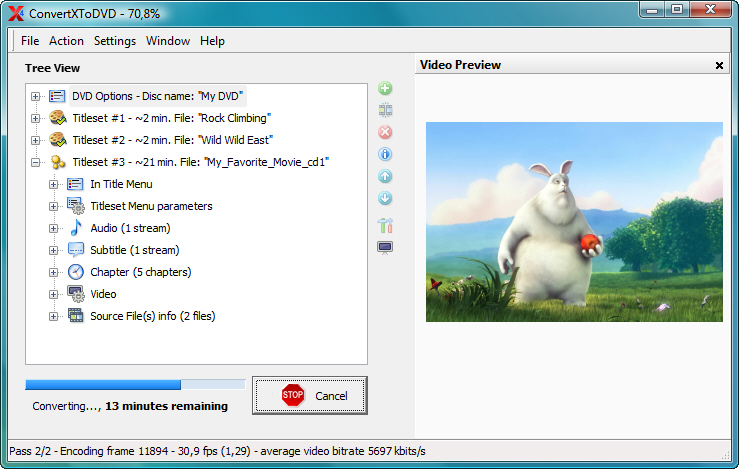
ConvertXtoDVD is a 1 click solution to convert and burn your movie files to a compatible DVD playable on your home DVD player. ConvertXtoDVD supports the most popular formats (including: DivX, Xvid, MOV, VOB, Mpeg, Mpeg4, AVI, WMV, DV, etc.) and supports subtitles. Equipped with a fast and quality encoder you get excellent results quickly. The recommended settings are selected so that you get the best result possible. There are many settings that can be changed to personalize your conversions.
The aspect ratio can be selected (4:3 or 16:9) as well as your choice for NTSC or PAL. You can create your own menu, merge files, add custom chapters, control burning speeds, and add original source files to the DVD! Multiple audio tracks are also supported. You can also give the interface you personal touch by choosing the theme and the arrangement of the windows as you desire.

Key Features:

  •  Supported video formats: Convert AVI, Mpeg, Mpeg4, DivX, Xvid, MOV, WMV, WMV HD, DV, MKV, DVD to DVD and more...
  • Supported sources: existing files from digital camcorders, TV/Sat, capture cards
  • Can merge up to 4 hours of material from several movies or episodes
  • Supported audio formats: AC3, DTS, PCM, OGG, MP3, and more...
  • Handles subtitles files (.SRT .SUB/IDX .SSA) with color and font selection, and supports tags (italic, bold)
  • Video format choice: NTSC, PAL, or automatic and PULL-DOWN
  • Picture output: Widescreen, Fullscreen, or automatic
  • Create Automatic chapters or edit your own
  • Fast preview mode to check if the source is loaded correctly
  • Save the DVD structure on hard drive or burn it to a blank DVD
  • Reliable burn engine integrated (supports all DVD formats)
  • Fast and quality encoder (typically less than 1 hour for converting 1 movie)
  • Variable options and settings for advanced users
  • Control of the conversion speed vs quality
  • DVD Menu control (auto-start, loop etc)
  • DVD Menu edition (background, font, color)
  • Customizable interface (themes, dockable windows)
  • Multilingual support
  • Optimized for Windows 2000 / XP / Vista
New features in version 4 include:
  • 2 pass encoding
  • multi-core support
  • new in house developed filters
  • compatible with Windows 7


Monday, May 17, 2010

Tipard Video Converter v4.2.12

Tipard Video Converter adalah sebuah program converter video yang dapat dengan mudah mengkonversi semua format video termasuk MPG, MPEG, MPEG2, SWF, FLV, VOB, MOD, MP4, H.264, M4V, AVI, WMV, 3GP 3GPP, MOV , DivX, XviD, QuickTime Video, DV, MJPG, MJPEG, MPV, dll, bahkan file video berkualitas tinggi (HD / video AVCHD)
Tidak hanya dapat melakukan convert video, program ini juga dapat mengkonversi file audio dan juga mengekstrak Audio dari Video kedalam semua jenis format audio dan lossless audio. Seperti M4A, MP3, AC3, AAC, WMA, WAV, OGG , AU, Nut, AIFF, FLAC, AMR. File-file yang telah dikonversi nantinya dapat dinikmati di iPod, iPhone, Apple TV, PSP, PS3, Wii, Zune, Xbox, Sony Walkman, Sony XPERIA, Google Phone, BlackBerry dan semua Perangkat Selular

Tidak hanya sebagai aplikasi converter, Tipard Video Converter juga memiliki fungsi editor, seperti menggabungkan video, memangkas klip video, cropping video, dan menyesuaikan efek video bagi Anda untuk mendapatkan video yang dioptimalkan, bahkan menambahkan watermark, pilih audio track dan subtitle. Untuk mendapatkan hasil yang lebih baik video, Anda dapat mengatur fungsi Deinterlacing untuk mencegah mosaik. Pengaturan output yang diberikan oleh video converter mencakup Encoder video dan audio, Frame Rate, Bitrate, Resolusi agar sesuai bagi pemain Anda untuk mendapatkan efek yang sempurna untuk kesenangan.


Features :
  • Support for mutual conversion between all video / audio formats, and HD video
  • Select the audio track and subtitle
  • Capture favorite pictures and images from video and save them on your computer.
  • High speed (> 400 per cent), fully supports dual-core processors
  • The ability to manually set the parameters of output files: speed, frame rate, sample rate, codec, channel, and video quality.
  • Batch conversion
  • Preview in embedded player
  • High speed
  • High quality results
  • a pleasant and convenient interface
Support Input File Formats :
  • Video : MPG, MPEG, MPEG 2, VOB, DAT, MP4, M4V, TS, RM, RMVB, WMV, ASF, MKV, AVI, 3GP, 3G2, FLV, SWF, MPV, MOD, TOD, QT, MOV, DV , DIF, MJPG, MJPEG
  • Audio : MP3, MP2, AAC, AC3, WAV, WMA, M4A, RM, RAM, OGG, AU, AIF, AIFF, APE, FLAC, NUT
  • HD Video: HD TS, HD MTS, HD M2TS, HD MPG, HD MPEG, HD MP4, HD WMV, QuickTime HD MOV, HD H.264, HD RM
Support Output File Formats :
  • Video : MPEG-4, H.264/MPEG-4 AVC, MOV, M4V, AVI, DivX, XviD, ASF, WMV, MPEG-1, MPEG-2, 3GP, 3GPP, MKV, FLV, SWF, VOB, DV , Super VCD (NTSC, PAL, SECAM), VCD (NTSC, PAL, SECAM), DVD (NTSC, PAL, SECAM)
  • Audio : AAC, AC3, AIFF, AMR, AU, FLAC, MP3, M4A, MP2, OGG, WAV, WMA
  • HD Video : HD H.264, HD AVI, HD MPG, HD TS, HD WMV, HD MPEG 4, HD MOV, HD ASF
  • Image : JPEG, GIF, BMP
Support Devices :
  • IPod, iPod Touch, iPod Touch 2, iPod Nano, iPod Nano 4, iPod Classic
  • IPhone, iPhone 3G, Apple TV
  • PSP, PS3
  • Wii, Zune, Zune 2, Xbox, Xbox 360
  • Google Phone, Sony Walkman, Archos, Creative Zen, iRiver, BlackBerry, BlackBerry Storm, BlackBerry Bold, Palm Pre, Motorala, LG, Sony Ericsson, Mobile Phone, etc

3herosoft 3GP Video Converter 3.3.1

3herosoft 3GP Video Converter adalah sebuah perangkat lunak, yang dapat meng- konversi video yang paling populer seperti AVI, MPEG, WMV, DivX, XviD, MP4, MOV dan RM ke 3GP, 3G2 dan MPEG-4 format video, yang semuanya didukung baik dengan berbagai ponsel termasuk Nokia, Motorola, BlackBerry, Sony Ericsson, Samsung dan jadi 3herosoft 3GP Video Converter juga dapat mengkonversi file audio termasuk MP3, MP2, AAC, AC3, WAV, MID, MIDI, WMA, M4A, RA, RAM untuk format audio MP3, WAV juga.
3herosoft 3GP Video Converter memiliki beberapa fungsi untuk melakukan pengeditan, seperti pemangkasan film, pengaturan encoder pada video dan audio , batch konversi dan lainnnya. Konversi akan selesai dalam beberapa klik, maka Anda dapat meletakkan video yang dikonversi ke ponsel Anda untuk Anda nikmati di mana saja dan kapan saja

Key Features :
  • Convert video to 3GP, 3GPP2, MPEG1/2/4, WAV, Xvid, RM, and to audio MP3, M4A;
  • Extract and convert the audio file from a video one;
  • Support the conversion of audio/video clips with customized starting point and length;
  • All Encoders and Decoders are built in;
  • Support preview function;
  • Support H.264/MPEG-4 AVC encoding/decoding;
  • Support to adjust parameters of audio/video codecs;
  • Fastest Conversion Speed;
  • Support multi-threading and batch conversion;
  • Support to set different zooming modes for the output file;
  • Support to set different splitting modes for the output file;
  • Support to set the name of the output file;
  • Support to edit the ID3 tag;
  • Support to view the source file information;
  • Support multiple skins;
  • Support multiple languages such as simplified Chinese and English;


System Requirements :
  • Operating system – Windows NT/2000/XP/2003, Windows Vista and Windows 7
  • Processor – 750MHz Intel, AMD CPU or above
  • Available HD space – 100 MB or more
  • Display – Super VGA (800 x 600) resolution or higher

Petunjuk Install :
  • Download dan Ekstrak
  • Lakukan installasi pada file 3gp-video-converter.exe
  • Setelah selesai tutup kembali program ini
  • Jalankan file crack.exe. Pada Vista dan Windows 7 jalankan file ini dengan Run as Administrator
  • Finish

RMVB Converter

RMVB adalah salah satu format video yang sangat baik, tetapi banyak perangkat lunak dan perangkat yang tidak dapat mendukung format RMVB, misalnya: iPod, Song PSP, IPhone, Mobile Phone, dll. Untuk itu diperlukan sebuah software yang dapat mengkonversi kedalam format lain
RMVB Converter adalah salah satu perangkat lunak bebas yang dikembangkan oleh RMVBCodec.com, dapat mengkonversi file RealMedia (RM, RMVB) ke format video populer lainnya dengan kualitas tinggi, dapat mendukung hampir semua format RM / RMVB tanpa menginstal RealPlayer, mendukung rip audio data dari RMVB video dan mengkonversi ke file audio MP3, terintegrasi semua decoders kecepatan tinggi dan encoders, converter RMVB ini adalah gratis dan mudah digunakan.

RMVB Converter can convert RMVB video files to below video format s:

  • MP4 (MPEG4)
  • AVI (MPEG2)
  • DivX (Digital Video Express)
  • Xvid
  • H.264/AVC
  • WMV (Windows Media Video)
  • WMV (Xbox 360 requires)
  • FLV (Flash Video)
  • MP4 (Sony PSP requires)
  • MOV (QuickTime)
  • 3GP (Mobile Phone)
  • MP3 (Only Audio)

Share

Twitter Delicious Facebook Digg Stumbleupon Favorites More